Blogroll

photoshop cs6 html 5 css php seo backlinks

adsense

Smarty Template Engine Step by Step Tutorial

Smarty has focused on how to help you make an high-performance, scalability, security and future growth application.

JavaScript was designed to add interactivity to HTML pages

JavaScript’s official name is ECMAScript, which is developed and maintained by the ECMA International organization.

This is default featured slide 3 title

Go to Blogger edit html and find these sentences.Now replace these sentences with your own descriptions.

This is default featured slide 4 title

Go to Blogger edit html and find these sentences.Now replace these sentences with your own descriptions.

This is default featured slide 5 title

Go to Blogger edit html and find these sentences.Now replace these sentences with your own descriptions.

Thursday, 23 January 2014

What is Outbound Links? how to get Outbound Links?


You've worked hard to get visitors to your web site. Should you provide outbound links? What if visitors leave via those links and never come back? Visitors leave when they've seen enough. Trying to box them into your site won't stop them from leaving. Besides, many visitors aren't even relevant to your objectives, so you may as well provide them with helpful directions to a more appropriate web site.

OUTBOUND LINKS AFFECT YOUR REPUTATION

If your site links to garbage, won't people think your site is garbage too? That's why link farms and reciprocal link schemes are such a bad idea. Sites that link to crappy resources show the world that they don't care what they say or recommend. They'll do anything to get attention, including keyword spam and link spam. No wonder Google and the other search engines remove or down rank such "spammy" sites.
By linking to quality resources that help your visitors, you can improve your reputation with human visitors. That ultimately leads to more inbound links, and higher response rates. With good information and a nice selection of outbound links, visitors may even bookmark your site and use it as a jumping off point. Human readers like information that is corroborated by other sources, and like web sites that help them learn more about a topic of interest.

ZERO OUTBOUND LINKS IS A BAD IDEA

Links are what makes the Web special, but if your site has no outbound links, it's a dead end. People generally don't like dead ends and won't send them much traffic. When you have no outbound links, the search engines may consider your site to be an inferior resource. They're trying to recommend good sites, so if they do their job correctly, they'll see things the same way human visitors do.
"But don't I need to conserve my PageRank?" asks the link miser. No, you don't. There are many factors that affect search rankings, including relevancy, and your site's reputation. Sometimes you have to give away PageRank to improve your reputation and make your site more valuable so it accumulates more links. In time you may end up with a higher PageRank than if you tried to hoard all those links.

WHAT ARE GOOD OUTBOUND LINKING OPPORTUNITIES?

Resource pages aren't my favorite because they're so unnatural. Why not place those links in context, rather than on a disembodied page of external links? Let's look at a few situations where outbound links are natural and helpful.
Whenever you use a term that your audience might not understand, consider linking to an authoritative definition. Search for the best available definition. Wikipedia is one of my preferred link destinations, but there are many other possibilities. If you mention a business partner or complementary service to your own, link to their site, even if there's no quid pro quo. If the link will help your visitors, that's reason enough. When the receiving site sees your name in their referrer log, they may take a look at your site, and may even link back to you. If you gather information from outside sources, you should provide a citation and a link. In addition to giving credit where due, your readers will appreciate that you've provided a way to verify your information.
For corporate sites, consider having a News Room and an In The News page where you can link to news articles about your company. The benefit is twofold: you help visitors find other, objective sources of information, and you potentially help those news articles rank higher in the search results by contributing your link.

Is External Linking Good For SEO?

External linking doesn't sound like it's that difficult of a situation but for many SEOs there's an ongoing debate about how you should do external linking on your website. This week Cyrus, our web strategist, goes over two very different methods of handling external linking on your website. While there are benefits and problems with each strategy, we want to know what method you use and why! Feel free to leave you comments below and discuss what method you use.
Welcome to another edition of Whiteboard Friday. My name is Cyrus. I am the web strategist here at SEOmoz. Today we're going to talk about external linking, linking to other websites. A lot of people wonder if this helps or hurts your SEO, and it has been a debate that has been going on ever since SEO started. So today we want to look at the two different schools of thought and see what we can find out.
Strategy one, let's pretend you have a site about red boots, and there is this great resource about amazing red boots. You have to decide if you should link to it or not on your page. Some of the arguments for not linking to it . . . oh, there we go. That's a good marker. Whiteboard Friday fail there. So, you might want to just keep your link juice internal instead of linking to that page. Keep everything within your own site so that you are not passing any value to this page because you really want to rank high for red boots. You also don't want visitors to leave your site. You went to a lot of work to get that visitor buying those red boots on your site. Why would you want to send them someplace else? Kind of makes sense. You also don't want to help your competition. If you link to them, you could elevate them in the rankings for these amazing red boots, and then people are never going to find you. By the same token, it might hurt your rankings. If you are linking out to all these other great sources, you might be telling Google, hey, these are better resources than my page about red boots. So you might fall down in the SERPs.
This is a school of thought. We see it a lot. We see people mention your brand and you read the article and they don't link to you at all. They don't link out. Some people think it is very legitimate. There is one piece of information we have that casts a little bit of doubt of whether this is a legitimate exercise or not, and that is the correlation data between external links and higher rankings. The 2011 correlation data showed that there was a 0.04 correlation between the number of external links on a page and higher rankings. Now, it doesn't seem like a lot, but taken in aggregate with all the other 200 ranking factors, it matters. It doesn't prove that a lot of links on your page are really going to help your rankings. But one thing it does disprove is this one - that adding external links to your page is actually going to hurt your rankings, within reason. If you don't take this to extreme, we can pretty much cross that one out. So, that is one theory of thought.
Now the other strategy, the strategy which I think is probably a little bit more friendly strategy, is you're a page on red boots, you have all these great resources, and you chose to link out to them without fear that it's going to hurt your rankings or that you're going to be helping your competitors too much. The biggest benefit in my mind of this technique is its automatic outreach. We spend a lot of time as SEOs writing emails saying, "Hey, will you link to me? I wrote this great resource." Just by putting a link out to somebody, they see that in their analytics. They see that traffic. It is kind of like tweeting about somebody. They know that you linked to them.
So, if I write an article on, actual example, SEO copywriting, and I link out to Copy Blogger because they are a great resource, Copy Blogger actually saw that I linked to them. They not only tweeted about my article, but they linked back to me in their weekly roundup. So by linking out I actually got a link back. Probably not going to happen over here. Here you might get a ton of links. Every link that you put out is actually an opportunity for outreach, and it is as simple as putting that in your editor, and, of course, adds value to your content.
If you want to be an authority on a subject, it makes it sort of look like an authority when you are referencing other materials. If you read a book, an academic book without a bibliography or citing any references, you might kind of wonder where they got their information. So it kind of helps you to look better in that respect.
Now this is controversial. It might add contextual signals to your content. Google is reading your page, and the other search engines too, and they're trying to figure out what your page is about. If you are linking to a page around the same topic, some people suspect that may tell Google, oh yes, this page is about red boots. You can sort of think of it in the spam context. If you have a page about red boots, but you are linking to Viagra, Google's going to say, "No, this page is not about red boots." If you are linking to a page about shoes, tons of shoes, yeah, that might help. We don't think it is a big signal, but some people think it is significant.
The final reason that this strategy may work, you see a lot of successful SEOs do it. It appears this might be a good strategy. The thing you have to be careful about with this strategy is your anchor text. If you are trying to rank for red boots and you link out using that red boots anchor text, that is probably not going to help you. You have to be a little creative with that. So, red boots, this is a great resource, tons of shoes, colorful footwear. Those are the sort of anchor text you want to use.
I am not sure which method is right. I know I prefer this one, but a lot of people actually prefer this one. What do you chose? Do you have any thoughts about which method is better? I'd like you to share your comments in the comments below and find out what everybody thinks about this.

How to get external links seo?

External Links

External Links are hyperlinks that point at (target) any domain other than the domain the link exists on (source).
In layman's terms, if another website links to you, this is considered an external link to your site. Similarly, if you link out to another website, this is also considered an external link.
Code Sample
<a href="http://www.external-domain-example.com/" title="link anchor text">Link Anchor Text</a>
Optimal Format
Use descriptive keywords in anchor text that reflect the same topic or keywords the target page is trying to target. It's not necessary to use the same keyword text every time—in fact, doing so can trigger spam detectors. Instead, strive for a variety of anchor text that enhances context and usability for your users—and for search engines, as well.

What is an External Link?

An external link is a link that points at an external domain.
  • Top SEOs believe that external links are the most important source of ranking power.
  • External links pass "link juice" (ranking power) differently than internal links because the search engines consider them as third-party votes.
  • Top SEOs don't believe that the "title" link attribute is used for rankings purposes.
External Links vs Internal links
From: 10 Illustrations on Search Engines' Valuation of Links

SEO Best Practice

Many top SEOs agree that getting external links is the single most important objective for attaining high rankings. This stems from the idea that external links are one of the hardest metrics to manipulate and thus, one of the best ways for search engines to determine the popularity of a given web page. This idea was first used by the early search engine Alta Vista and later improved upon by by Google.
Google first made its mark by introducing the Stanford community to PageRank (an algorithm developed by Google co-founder Larry Page). This algorithm counted hyperlinks as votes for popularity. The pages that had the most links pointing at them were considered the most popular. When they were deemed relevant for a particular query, the most popular and relevant pages would become the first pages listed in Google's results. Although this algorithm is much more complex today, it still likely includes the notion of external links as votes.
Today, the major search engines use many metrics to determine the value of external links. Some of these metrics include:
  • The trustworthiness of the linking domain.
  • The popularity of the linking page.
  • The relevancy of the content between the source page and the target page.
  • The anchor text used in the link.
  • The amount of links to the same page on the source page.
  • The amount of domains that link to the target page.
  • The amount of variations that are used as anchor text to links to the target page.
  • The ownership relationship between the source and target domains.
In addition to these metrics, external links are important for two main reasons:
1. Popularity
Whereas traffic is a "messy" metric and difficult for search engines to measure accurately (according to Yahoo! search engineers), external links are both a more stable metric and an easier metric to measure. This is because traffic numbers are buried in private server logs while external links are publicly visible and easily stored. For this reason and others, external links are a great metric for determining the popularity of a given web page. This metric (which is roughly similar to toolbar PageRank) is combined with relevancy metrics to determine the best results for a given search query.
2. Relevancy
Links provide relevancy clues that are tremendously valuable for search engines. The anchor text used in links is usually written by humans (who can interpret web pages better than computers) and is usually highly reflective of the content of the page being linked to. Many times this will be a short phrase (e.g., "best aircraft article") or the URL of the target page (e.g., http://www.best-aircraft-articles.com).
The target and source pages and domains cited in a link also provide valuable relevancy metrics for search engines. Links tend to point to related content. This helps search engines establish knowledge hubs on the Internet that they can then use to validate the importance of a given web document.


How to Get Google Subheadings in Search Results? How To Get Even More Google Sitelinks?

The goal of this tutorial is to make your website's search engine result look like this:
Google Search Result with Sitelinks
Note: #1 points to your main URL (ex: www.relishtraymedia.com) and #2 points to the important internal links from your site (ex: www.relishtraymedia.com/blog), otherwise known as the sitelinks

Sitelinks & Why You Want ‘Em!

The tiny subheadings (aka internal links) that are shown below a website’s main URL in Google's organic search results are called SitelinksThese links serve as shortcuts to the most important pages of your site; they help prospective visitors easily find the information they need and navigate your site in a timely manner. Sitelinks not only provide insight into your site’s structure and bring information and options up front to users, but they also expand your search engine real estate and click-through rates. Here are some more key benefits:
  • Higher link visibility, which leads to more traffic
  • Decrease in bounce rates, since users can zero in on specific pages
  • Push competitor sites further down the page
While other results are shifted below, each of your sitelinks showcases more meta description text (about 48 characters of bonus advertising!).

What You’ll Need to Set Up

First of all, you’ll need to sign up for a Webmaster Tools account. While you’re at it, I recommend setting up a Google Analytics and Google Adwords account as well. Even if you’re already using another SEO/keywords service, these tools are free, so take advantage of them as backup analytics sources.

How You Get Sitelinks!

First you’re going to need a Sitemap (.XML). If you already have a sitemap for your website, you can usually find it by typing http://utclassweb.blogspot.com/sitemap.xml in your browser. If you don’t have one, you can create a sitemap manually or by using third-party tools. A simple solution is to use this XML generator:http://www.xml-sitemaps.com/. Follow the instructions on the site to create your map.
As an example, here's a portion of Relish Tray Media's sitemap: 
<?xml version="1.0" encoding="UTF-8"?>
<urlset
      xmlns="http://www.sitemaps.org/schemas/sitemap/0.9"
      xmlns:xsi="http://www.w3.org/2001/XMLSchema-instance"
      xsi:schemaLocation="http://www.sitemaps.org/schemas/sitemap/0.9
            http://www.sitemaps.org/schemas/sitemap/0.9/sitemap.xsd">
<!-- created with Free Online Sitemap Generator www.xml-sitemaps.com -->
<url>
  <loc>http://www.relishtraymedia.com/</loc>
  <changefreq>weekly</changefreq>
  <priority>1.00</priority>
</url>
<url>
  <loc>http://www.relishtraymedia.com/blog/</loc>
  <changefreq>weekly</changefreq>
  <priority>0.80</priority>
</url>
Also, if you do not comprehend the frequency, priority, or modification settings, here are some Sitemap tag definitions.
Sitemap Tag Definitions 
Once your sitemap is complete and downloaded from XML-Sitemaps.com, upload the sitemap.xml file to your site (in the FTP or your site’s file manager). By now, you should be able to typehttp://www.yourwebsite.com/sitemap.xml in your browser and see the sitemap you just created (note: there may be a few additions to the URL, if your file is hosted in a CMS portal or FTP subfolder). Now, follow these easy, Google instructions for submitting your sitemap into Webmaster Tools: http://bit.ly/IBr8Lo. To quickly summarize, go to Webmaster Tools and click Optimization > Sitemaps. In the upper right corner, click "Add/Test Sitemap," and enter the sitemap URL, like this:
Add Test Sitemap Webmaster
Note: Test the Sitemap before submitting it.

Go Forth & Conquer … but Read This First

Here’s a couple things you should know: As of now, Google automatically generates your sitelinks using an algorithm – you do not have direct control over what links appear below your main URL. However, you candemote sitelinks in your Webmaster Tools account if you don’t feel a specific URL is a good "shortcut" candidate. For demoting a link, go to Webmaster Tools > Configuration > Sitelinks and enter the URL in the second text box.
Demote Sitelink Webmaster
Again, there's no guarantee that your sitemap will generate search engine sitelinks. You need to make sure that your "site's internal links,...use anchor text and alt text that's informative, compact, and avoids repetition” (Google). Many theorize that sitelinks are generated from a combination of website authority (i.e. inbound links), traffic, and branded keywords. At the very least, make sure that your site’s link structure is clean and sensible. Also, take time to mark up the contents of your pages to help Google decide which internal links to showcase.

How To Get Backlinks From Authoritative Websites?

If you are having a blog or a website and already started seeing some visitors you'll most likely get excited by all the great opportunities that arise: suddenly people give you feedback via blog comments acknowledging (finally) the hours you've put into developing your individual articles. But after a while you'll ask yourself if that's it or if there is still more potential to rank higher for some of the more competitive terms you might be targeting with your blog.
How can you achieve that? Of course, with strong backlinks because Google likes strong backlinks from authoritative domains with a PR of 8 and above. Certainly, PR is not as important as it used to be and you should take that with a grain of salt. Yet the PR will give your a general idea how well your back link will improve your ranking.


What does authoritative mean?

When I say authoritative I mean websites that have been in the business at least for a couple of years. So domain age is an important measure to gauge if a website has certain rank. If you're active in your niche you certainly know which sites have this kind of authority. But those website don't have to be in your niche, general interest portals can provide high back link value, too. So your first step is to find out which websites or blogs carry the most authority in your industry. You should have your set of most important keywords ready and Google them accordingly. Then you may want to organize those results in an Excel spreadsheet.


Using the MozBar and SEO Quake

MozBar backlinks check

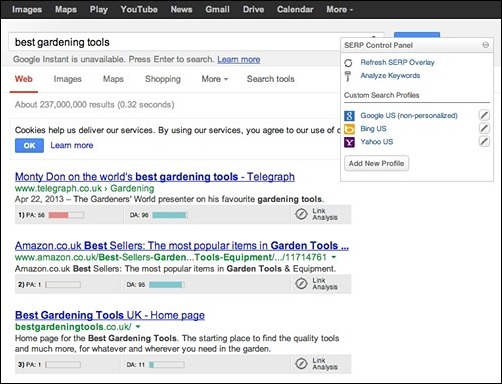
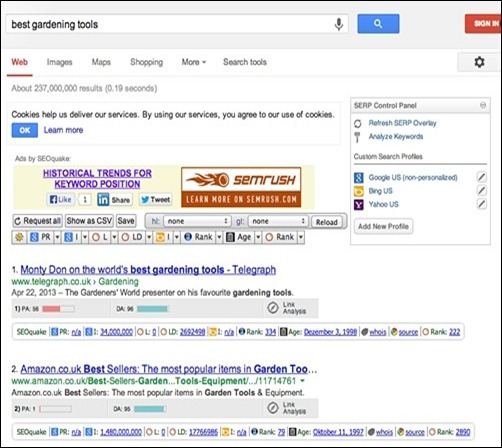
For a quick overview I highly recommend using the MozBar which provides you with a SERP overlay with the page authority (PA) and domain authority (DA). You can use the browser extensions for free. Yet, if you'd like to take it up a notch you and do further analysis in Excel you need to pay for a subscription to their services. If you'd like to know the page rank as well, you might also want to use the free SEO Quake extension. It allows you to sort results based on a couple of factors and export the results as a CSV. If you're using both at the same time it might get a little crowded, though.
SEO Quake backlink and PR check


Using Scrapebox for advanced scraping

If you really want to dig deep and find some great authoritative domains you may want to have a look at Scrapebox. Yes, I know, many people think of Scrapebox as a spam tool and certainly it is used that way but you can do great white hat things with it as well, especially if you need to comb through a lot of keywords. After scraping a list of URLs you can use the PR checker and mass analyze page rank for your URL list. Export that list into an Excel chart and do further analysis with it.
ScrapeBox


My Tips for getting great back links

First of, you need to remember it's not a race, it's a marathon. So, you need to be patient while waiting or actively pursuing the perfect link from an authority site in your niche. Back in the day it was very easy to get a do-follow Wikipedia backlinkand your ranking would start jumping up. But it got abused by spammers so Wikipedia did the right thing: they unfollowed every link out to other websites. Wikipedia links still can be very useful because they might bring you traffic. Many people who are writing articles for the web start their research with Wikipedia and if your link happens to be in the resource list you might get the link you're after. Of course, your links will only stick if they are relevant and of high quality. But there are other great tips to get links from authority sites:
  • Relationship building
    This is one of the best, yet the most time consuming part of the backlinking process. You need to be aware of what's happening in your industry and follow the people who really matter: who has a large following on Facebook or Twitter? Who's an authority on Google+? Think about how you can help these persons without asking anything in return. It will be the best ROI for your link building efforts.
  • Produce high quality content
    You need to get your best content out there. Great content gets links over time. Create massive content pieces that cover a topic in-depth. Add videos and how to's to it to improve it even more. Of course, those pieces are expensive and cost a lot of time but they will help you become an authority and build trust and credibility.
  • Linkbaits
    Linkbaits are a great way to get a good deal of links. One of the easiest ways to create a linkbait is creating a top list of bloggers in your industry. Bloggers like to get noticed so possibly they pay you back with a link to your site. Also, it can help you build a relationship with top influencers.
  • Interviews
    Those above mentioned linkbaits might help you land an interview with industry experts or top bloggers. If you can do a video or Skype interview and provide a transcript that will be most helpful and provide good SEO value as well. It might not be easy because top bloggers can be very busy but use your list of authoritative sites that you created before to scale your outreach.
  • Hustle
    Hustling is very important to get "the" link. Ask for links to your best content and if its good enough people will like it and link to it. So make sure your content is extremely useful and scratches a common itch.
  • Sponsorships
    If you have some budget you might want to consider sponsorship opportunities. If you can you might want to consider doing this in the educational field. That might lead to juicy .edu back links. Of course, you could just sponsor a prize or something less sophisticated. Use a Google advanced query like: "your keyword" inurl:sponsors
  • Buying backlinks
    Buying backlinks is a dangerous habit as it infringes Google policy and might result in a permanent de-indexation of your website. Of course, that's devastating so I highly discourage you from buying links for your "money site" or main business. You can experiment with buying links on satellite domains and see their effect. However, buying backlinks can never be a safe strategy as Google is getting better and better identifying and devaluing such backlinks.
  • Guest posting
    You're reading a guest post right now. Of course, this is an effective strategy in getting a link back to your site and build your authority. If you choose to guest post on a blog or website with a loyal following such as bloggersentral you can be sure it will have a positive effect on your brand or blog. It can be time consuming but it is certainly well worth the effort.


Beware: you need a diverse link profile

Google likes a diverse back link profile because this is how websites naturally acquire backlinks: gradually and over a period of time from a variety of sources. So our goal as SEO, web masters and blog writers is to mimic this kind of natural link growth. So you need backlinks from highly authoritative domains and domains with a PR0 or 1 alike.
Just be sure your link profile looks natural that's why you shouldn't only build backlinks that have your keyword as anchor text. Instead mix things up by following a natural pattern. Highly authoritative website will most likely link this way, too. Don't force them to use exact anchor text. Instead be happy to have acquired one of the best links possible for your site.

If you take your time and see your rankings as a marathon you'll have great success and climb the SERPs.

How to Build Inbound links? 32 White Hat Ways to Build Inbound Links

Get Your Blog On

1) Maintain a steady blog. Consistently creating great blog content that people naturally want to link to is one of the most tried and true ways to organically generate inbound links.
2) Set up an RSS feed for your blog. This makes it easier for others to syndicate your content and then provide attribution links back to your website.
3) Link to other blogs on your blog. A blog is meant to be a social tool. The more you link to others, the greater likelihood one of those bloggers will return the favor.
4) Write guest blog posts. Shop them around to blogs they'd be a good fit for. If one accepts, they should be willing to give you an inbound link in the post (much like this very article!).
5) Create resource lists. Resource lists are both great link bait, and helpful content for your readers. If you create a comprehensive resource list, it will be easy for other bloggers to link to it in their own posts instead of rehashing and curating all that content themselves.
6) Do some newsjacking. If you are the first blogger to comment on a news event, you'll rise to the top of the SERPs due to the freshness component of Google's algorithm, and others will link to your content in their own accounts of the story.

Create Content Beyond Your Blog

7) Create case studies about your most impressive clients. If you make your clients look good in case studies about their business, you can bet they'll be linking to your site!
8) Administer a survey. And promise to share the data with others! If you do the data collection and crunching and give some high authority sites access to the findings afterwards, you can bet they'll do some promotion and inbound linking for you to make sure you have a great sample size!
9) Write a book review. If you provide a comprehensive review about another author's content, there's a good chance they (and others!) will link to it.
10) Conduct a free webinar, and post an archived copy online. If it’s informative, your attendees will absolutely share it.
11) Create free tools. HubSpot, for example, created Marketing Grader to which many agencies, partners, and others in our industry link.
12) Create templates. What templates would make people's jobs easier? A designer, for example, might create a library of downloadable business card templates to which others could link over and over! Bookmarkable content is often the kind of content that gets tons of inbound links.

Whip Out Those Design Skills

13) Create an infographic. People absolutely love to share infographics. Share your design with those that you cite as data sources, and make the embed code for your infographic easily accessible.
14) Create other forms of visual content. Remember that cartoons, content visualizations, charts and graphs, and the like are extremely popular as people become more and more visual. Plus, they take a little time and money to make, so if you've done the legwork, others will probably skip the fuss of creating their own visual content and link to yours instead!
15) Create a presentation. Slice one of your infographics into pieces, or repurpose one from your last speaking gig. You can put these up on your blog, in your website's resource center, or even on a SlideShare account for more links.
16) Create a meme. Even your Microsoft Paint skills can build links. Memes are known, above all else, for spreading and evolving -- use your social media accounts to make it spread even further!
17) Speaking of memes, do something funny! Funny things spread like wildfire. Think about the funny inside jokes in your industry, and capitalize on it with some humorous content that is linkable!

Use Your PR Skills

18) Write a press release about interesting company news. Post it up on your website, and push out your releases to one of the big newswires to get more coverage.
19) Send out a joint press release when your news involves another company. This can help reach thousands of other related sites that, in a press release about just your company, may not have linked to your site.
20) Do some outreach when you have big news or a great piece of content. Reach out to a handful of journalists that you can see really valuing your story. Create a dedicated page about the story for them to link to as a resource.
21) Get interviewed. Services like Vocus’ helpareporter.com, also known as HARO, work wonders for finding big linking opportunities. Be sure to ask journalists to include a mention of your company in any quotes they use so there's a more natural opportunity for an inbound link.
22) Write an "op-ed" article. Target online versions of big newspaper and magazine publications for an extremely valuable inbound link.

Build Partnerships and Relationships

23) Partner with companies in complementary industries. It’s common practice for corporate channel partners to link to each other's great content, because they have a vested interest in one another's success.
24) Ask for reviews. You can ask users of your product and industry experts or analysts to review new features you're rolling out, for example. Not only will you receive an inbound link, but you'll also get great feedback and strengthen your relationship with those you asked to write reviews.
25) Make friends with other webmasters in real life. Strengthening your relationship with other webmasters will open the door for relevant inbound link requests when future opportunities arise, and make it more likely those requests don't fall on deaf ears.
26) Search for and monitor mentions of your brand. Contact webmasters about turning those mentions into inbound links, but only when it's warranted -- like when they're citing data of yours, for example.

Leverage Social Tools

27) Incorporate "Tweet This" links into your data driven content. Part of getting inbound links is getting your content out to the masses. Including "Tweet This" links for tweetable nuggets in your content will get people sharing your content socially more often, which means greater visibility in search engines, news feeds, Twitter streams, etc. -- and thus more opportunity for your data to be referenced in other people's content.
28) Install social sharing widgets. Just like "Tweet This" links get your content out there, so dosocial sharing buttons and widgets. Put them on your marketing content like case studies, whitepapers/ebooks, and blog posts!

Do Some Volunteer Work

29) Sponsor or speak at an event. Events usually give their speakers and sponsors great website publicity. You can also negotiate inbound links into your terms to be sure your time and resources yield a beneficial inbound link.
30) Volunteer to be the subject of a case study. We're always looking for customers who are willing to be the subject of a case study. Volunteer your time for one of your major vendors, and get a backlink from the case study once it's published.
31) Help another webmaster fix an error on their site. Remember when I said you should get to know other webmasters? This is another time those connections will come in handy. When you find broken links on others' sites, let them know, and provide them with a piece of your own content that would be a suitable replacement for that broken link.
32) Give away free trials and sneak peeks of your product. When people get to see your product beforehand, they will want the world to know they're part of the VIP crowd, and might write a review with a link back to your site about it.

How to Avoid Backlinks that will hurt your Website Ranking?

Google's Algorithm Updates

A couple years ago Google changed it's algorithm to try and prevent websites from gaining any benefit from selling links by removing the PR (Page Rank) from most link pages on the Internet (which included link pages in directories). Google also encouraged the use of "rel="nofollow" on outgoing links if site owners wanted to preserve the PR on their web pages.

Recently, due to Google's Panda and Penguin algorithm updates, now even link trades, or other forms of what used to be acceptable methods of gaining links, are being filtered out of search results if they encompass a high percentage (or ratio) of your overall link profile. In other words, Google is able to recognize and filter out a major portion of your traffic if it finds unnatural patterns in backlinks on your site. The links coming into your website should be from quality sites with relevant content (not content or link farms) and it must not look like you paid someone to do it or that you did it yourself.

What Google wants to see now is "organic" links, i.e., the incoming links look as natural as possible, preferably within the content of a page. When Google is looking at your linking profile it doesn't like it when you use the same words in the anchor text of the link, or when you link to the same page all the time (other than your home page or using your business name). Of course the best way to get these is to produce something that people find very useful that they link to on their own, such as helpful tips, tutorials, videos, etc.

If your website has dropped in rank in Google recently it may be due to either a penalty, being filtered out of results, or a majority of your backlinks no longer being counted due to the sites you got backlinks from were penalized so their links no longer produce any value for your site. Which of course means that you need more better quality links.

Backlinks to Avoid

Be cautious about submitting your website if any of the following backlink methods occur (You may need to view source code to find some of them):
  • Don't submit to sites that aren't relevant to the focus of your site.
  • Avoid pages with links inside of frames (this will steal your traffic).
  • Don't submit to blog networks and limit blog rolls
  • Don't submit to article networks (they post your article to multiple sites).
  • Don't let anyone link to you from every page of their website (sitewide links unless they are nofollowed).
  • Free for All Links - they allow anyone to post a link unreviewed which results in unrelated and spammy links (banned by search engines and may also affect your site if you link to it).
  • Link farms - 100 or more unrelated links on a page (banned by search engines and also your site if you link to it).
  • Bad Neighborhoods - Poooorrrrnnnooo or gammmmbling or drug sites (banned by search engines and also your site if you link to it)
  • "I'll link to your website if you link to my other website over there" is called a Triangular Linking Scheme(can cause your website to be penalized or banned).
  • The site has a network of mirror sites with exact same web links (these sites may be banned and your link on their site will produce no benefit).
  • Avoid submitting to directories that don't review submissions and let anyone in.
  • Avoid submitting to directories that have several Google ads disguised to look like their own content above the other links as they are likely to be penalized.
  • The link page or directory is not linked from their home page or site map (search engines won't find your link).
  • If the website is supposedly a directory but you have to search to find anything your site won't be found by Search engines.
  • If the backlinks on the page have a rel="nofollow" tag on them the search engines won't give you credit for the PR (page rank). Some directories are doing this to protect the PR of their page (it won't provide PR but may bring you traffic). However, even though most local sites put "no followed" on the link, it can still help your ranking a little bit (called a citation) so don't ignore those.
  • The website takes forever to load (too many ad banners, etc.) and search engines won't wait which means they won't index your link on their page if it's at the bottom of the page.
  • The website is poorly designed and has broken code, etc.
  • Avoid sites that insist on a link trade as the only option because search engines may devalue all their links when all their links are traded.
  • Don't submit to sites that have no contact page in case you want to remove the link later.
You can check to see if a site has disallowed search engines from following a page by checking their robots.txt (enter www.TheirDomain.com/robots.txt). If you see anything like "Disallow: (with the url for the page your backlink would be on)" then they have told search engines to not follow the links on that page.

SEOMOZ set up a list of directories that have been penalized or banned by Google. You might check this list occasionally to see if it's updated.

How to get backlinks from Google: Google backlinks? Video Tutorial

Website ranking involves more than just putting your website online. The old addage, "Build it and they will come" is no longer true. In order to find good backlinks you need to not only have quality content on your website but also focus on getting good backlinks from relevant websites.

What are Quality Backlinks?Best Linking Practice. Finding Backlinks For Your Website?

What are Backlinks?

Backlinks are links on other websites pointing at your website. Without adequate links pointing at your website it will likely never achieve higher keyword ranking.

Good Backlinks Improve Website Ranking

Website ranking involves more than just putting your website online. The old addage, "Build it and they will come" is no longer true. In order to find good backlinks you need to not only have quality content on your website but also focus on getting good backlinks from relevant websites.

Search engines rank websites according to how many quality backlinks they find pointing at your website. Quality is determined by how relevant the other site is to your site and where the link is placed on their page (within the content is best) and how many other links are on the page (less is better). A large number of links pointing at your site does not guarantee success. You need quality backlinks in order to rise to the first page of results and the more you can find the better. The best way to encourage people to link to your content is to provide information that is useful to your visitors, like "how to find backlinks".

Also see Search Engine Optimization TipsS for more linking ideas.

What are Quality Backlinks?

  • Your link on a site with high PR (page rank)
  • Your link on a page with few other links
  • Your link within the content of the page (not the footer or sidebars)
  • A link from a relevant site
Google recently changed it's algorighym so that if there is an excess of traded links, purchased links, or if you get involved in triangular linking schemes, or buy hundreds or thousands of links, then it will draw a red flag for Google and then Google may apply a filter to your site to prevent it from ranking well.

An occasional, relevant link trade is ok and having to buy a link in Yahoo directory or another directory that is human reviewed where you have to pay for the review (and not the submission) is OK, but anything in exess can cause you problems with your ranking in Google because they can tell when link gathering is not normal as it keeps a record of your link profile which affects your trust ranking.

Google is having to do this due to too many finding some new trick that helps their keyword rank (like hidden text) and then everyone else follows suit and then Google has to clamp down on that practice — until next time someone comes up with a "bright idea" to boost their ranking.

So anything you do to try and manipulate your rank in Google can draw a red flag and your site could be banned, penalized or have your keyword rank filtered out, i.e., you won't be able to rank for anything no matter what you do.

Best Linking Practice

The best, and easiest, method to gather links is to provide something on your website that people will want to link to, i.e., if you build bridges offer free bridge building plans, if you sell dessert products offer free recipies, if you provide a service write up a FAQ about your service, etc. On LWD, I provide a lot of HTML tipsCss Tips,graphics tutorials and articles on keyword ranking and other topics. 

Finding Backlinks For Your Website

Google uses age of the site, backlinks, social networking as well as PR to rank sites (along with many other factors) so, unless you want to PayPerClick for the life of the site, you need to gather a lot of links and write a lot of content to get ranking as high as possible as it's doubtful that your competitors will be sitting still and doing nothing.

  • Find friends, businesses associates, individuals, or organizations who are willing to link to your website as soon as it's online, then you won't need to submit to search engines because the search engines can find your link on a site they have indexed already. Some of them may require a link trade but try to get mostly one-way links.
  • Relevant Links: Look for websites focused on what your site offers but have a different focus, i.e., submit to a gardening site if you sell garden tools.
  • Competitors Links: Check to see where your competitors are getting their links and try and submit your website there also.
  • Find Directories in Your Own Niche Submit to directories in your own niche, i.e., if you sell or offer information about vitamins then look for directories focused on health products. However Google has demoted directory links so don't put a lot of focus on these.
  • Free Submission Directories If you aim for free submissions from directories you may need to request about 10 times as many backlinks as you actually need as very few free links are accepted by directories claiming to accept free submissions. They do this so they won't be penalized for only offering paid links. When submitting, change your anchor text (title of your site) frequently so there is a wide variety of keywords to rank for, however you will probably have to pay for anything other than your official site name.

  • Write Articles Write quality articles related to the focus of your website and submit to other sites that accept guest writers. Provide a link within the article to your site related to the focus in the article -- not necessarily your home page. Do NOT post the same article on your own website or you may be penalized for duplicate content.
  • Submit Press Releases Only submit press releases when you have a valid reason for one--any new development on your site or an original focus with your products that the customers on the press release will be interested in.
  • Blogging Post messages in blogs related to the topic of your site with a link to your website within the post where appropriate. Try to get links that are NOT "no followed" but even those will help your rank a little bit due to your site being mentioned (it's called a citation).
  • Participate in Forums Find forums related to your website's focus and post often so you will get noticed and build up trust so people will click on the link in your profile or signature and possibly link to your site from their own site or in other forums showing where they found valuable information. Most forums now put a rel="nofollow" on all outgoing links so this may not benefit you with ranking but may bring some traffic.

How Many Backlinks is Enough?

That depends on your major keywords. Are they popular? If so, you will have a struggle to beat your competition and may have to resort to PayPerClick along with backlinks.

If very few websites advertise what you offer then you may not need very many backlinks to rank high in the search engines but your traffic may still be minimal because of your site being so specialized. In that case diversify and add more information.

Your backlinks need to be replenished each year because some sites along with their backlinks go offline. Your competitors are probably eagerly seeking more backlinks to outrank you so unless you actively seek more backlinks each year your rank may drop.

Pay Per Click is only temporary

Getting good quality backlinks is a lengthy process and can take several months--unless you want to utilize PayPerClick (Google's AdWords) and then it can achieve almost immediate results but those results will end as soon as you quit paying so it's a good idea to gather links at the same time.

Photoshop Metal Structure Text Effect in Photoshop Tutorial

Another Photoshop Tutorial for you, this time we have prepared Photoshop Text Effect Tutorial, today we are going to make a Text in Photoshop which shows like Metal Structure Text Effect in Photoshop. Very short and easy tutorial, as usual some Tools and Commands to use in thisPhotoshop Tutorial. Enjoy working on this tutorial so you will learn some basic Technique in Photoshop.
Here is what we are going to give the Effect:

Step 1:

Let’s start out by creating a new file. I used a 1400×800 pixels canvas set at 72dpi, and I filled my background with Black. Now select the Horizontal Type Toolhorizontal-type-tool, then set the font family to Arial, Bold Italic, 90 pt, Strong and #818181 color shade. In a new text layer, type your text.

Step 2:

Under Layer Style (Layer > Layer Style) add an Inner ShadowInner Glow, and Gradient Overlayblending options to your text layer.
Result:

Step 3:

In a new text layer type your text again and position as shown below.

Step 4:

Under Layer Style (Layer > Layer Style) add an Drop ShadowInner ShadowInner Glow, andGradient Overlay blending options to your second text layer.
Result:

Step 5:

Make a new layer set and name it ‘Screw‘. In a new layer, draw a small white circle with 5 x 5 pxdimensions on one of your letters.

Step 6:

Under Layer Style (Layer > Layer Style) add an Drop ShadowInner ShadowInner Glow, andGradient Overlay blending options to your second text layer.
Result:

Step 7:

Now add more screw design on the rest of your text.

Final Result of Metal Structure Text Effect in Photoshop:

So after spending time here we have finally prepared our Metal Structure Text Effect in Photoshop, hope you have enjoyed this tutorial and will be making by your own, I’ll be waiting for your comments.